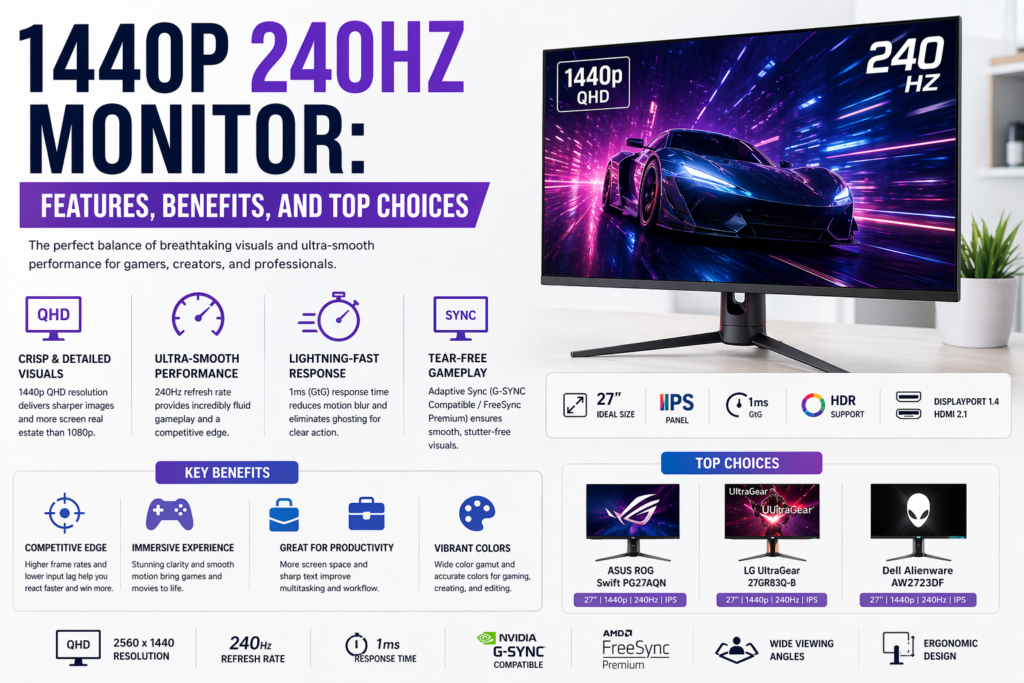
We are headed into a time when performance, clarity and responsiveness is no longer an option; it has to be a given. A 1440p 240Hz monitor has the ideal combination of cutting-edge resolution and ultra-fast refresh rate. This marriage of resolutions offers outstanding visual fidelity without compromising speed, making it perfect for competitive gamers or the most demanding professionals.
The jump takes users well above 1080p, with 2560×1440 resolution providing those images much crisper and with better detail along the fine lines of everyday computer work. Along with this, the ultra-smooth motion brought by a 240Hz refresh rate means you can see what’s happening more clearly and get an edge on the competition in fast-paced situations where things need to be moving along nicely.
Key Features That Define a Premium 1440p 240Hz Monitor
An exceptional speed, clarity and visual consistency in a single package is what defines a premium 1440p 240Hz monitor. It has a flat screen with 240Hz refresh rate for ultra-smooth motion, response times of 1ms or less to eliminate ghosting, and QHD resolution to ensure planets look sharp on your ship’s HUD. Higher-end models incorporate technologies like G-SYNC or FreeSync for tear-free performance along with advanced panel technology (IPS or fast VA) for accurate colors and wide viewing angles.
1.Ultra-High Refresh Rate for Smooth Motion
A 240Hz refresh rate means the display is refreshed (or updated) 240 times per second. This translates into:
- Reduced motion blur
- Lower input lag
- Smoother gameplay and animations
- This can greatly enhance response time and accuracy in competitive gaming.
2.QHD Resolution for Enhanced Clarity
Quad HD (QHD) aka 1440p offers:
- Sharper visuals than Full HD
- More screen real estate
- Better detail in buildings and environments
- This is particularly advantageous to users who do a lot of multitasking or work with detailed visual content.
3.Fast Response Time
Almost all modern high-end 1440p 240Hz monitors will come with response times of 1ms or lower, ensuring each frame can transition cleanly, helping to minimize ghosting. That’s essential to accurate visuals during fast moves.
- Adaptive Sync Technology
- Support for technologies like FreeSync or G-SYNC guarantees:
- Tear-free visuals
- Smooth frame synchronization
- Stable results at several different frame rates
- Screen tearing and stuttering is eliminated, creating a smooth viewing experience.
Read Also: How To Turn Off Notify Anyway | TechSized Com
Panel Types — Selecting the Correct Display Technology
IPS (In-Plane Switching) Panels
For a 1440p 240Hz monitor, IPS panels are considered the best all-round choice thanks to their color accuracy and wide viewing angles. They deliver steady and vivid images regardless of viewing angle, making them excellent for competitive gaming and professional creatives alike. Today, modern IPS technology has significantly decreased response times whereby we can enjoy fast performance without compromising visual quality — a former limitation.
TN (Twisted Nematic) Panels
TN panels offer the lowest input lag and fastest response time, making them best for an extremely competitive gamer with speed being a top priority over everything else. They are ideal for ultra-responsive gameplay, meaning low motion blur even in hectic action. Of course, TN panels are historically worse at color reproduction and viewing angles, so depending on how the laptop was used in addition to performance that could change how enjoyable the visual experience is.
VA (Vertical Alignment) Panels
VA panels are more renowned for better contrast ratios and deeper blacks, thereby offering an immersive viewing life, particularly in a darker environment. These panels are attractive for cinematic gaming and media consumption, where deep contrast adds appealing depth. VA panels have come a long way, but they are still somewhat slower than IPS and TN in terms of response time; this may result in mild motion smearing over very fast objects.
1440p 240Hz Monitor: Use Cases
Whether you are gaming at the highest resolution or rocking ultra-smooth real-time action, a 1440p 240Hz monitor is hard to beat in so many situations. It’s especially effective in competitive gaming, where fast-paced titles require instant response times and fluid motion—by providing minimal input lag at a high refresh rate while offering sharp detail with 1440p resolution, you’ll notice when you can react faster to your opponents. Outside of gaming, these monitors are especially great for content creation: creators get the best of both worlds with resolution and performance — accurate colors and detail coupled with enough screen space to work on videos or graphics without needing a second monitor for complex visual projects. On a general level, for multi-tasking productivity, the broader pixels lead to comparatively better pixels per inch of surface area and help allow us keep several windows, documents and apps open while not straining our focus or physical comfort. While 1440p + 240Hz monitors aren’t the same be-all-end-all approach to productivity as high-PPI display panels, they’re damn close, and also fairly versatile on their own as an all-in-one powerhouse for speed and accuracy-hungry audiences.
Benefits Over 1080p and 4K Displays
A 1440p 240Hz monitor offers a compelling middle ground, giving you the best of both worlds over a pair of competing resolutions in all the right areas. The benefits over 1080p monitors are staggering sharper image clarity higher pixel density as well as more screen real estate for gaming and productivity. Text looks clearer, the detail is greater and it makes multitasking a lot smoother. However, in comparison with 4K monitors, the refresh rate is significantly higher with smoother performance at1440p at 240Hz and lower stress on the graphics card. This means we can maintain very high-frame rates, without having to go for the real expensive hardware. The result is fluid movement, lower input lag and responsiveness that can be harder to keep at 4K resolutions. In the end, 1440p 240Hz is the perfect compromise between gaining detail due to higher resolution and speed to satisfy modern high-performance computing and gaming.
Top Considerations Before Buying
As a first step to buying any 1440p 240Hz monitor we need to weigh up a list of very important factors and considerations in respect of performance requirements. Two, the 240Hz performance of a 1440p display translates as a game that can maintain high frame rates (frame time FPS) its really only as good as your graphics card if it drops down to low single digits you wont ever see much on the screen with out some serious hardware. And equally important is the balance of budget and performance, where we choose things like panel type, response time, adaptive sync support but do so within a reasonable cost that properly provides value over the long haul too. Additionally, we also follow the monitor size and ergonomics because 27 inches display is a good figure for proper visibility and desk space as well while large screens give us more immersion but needs the distance to see it. Similarly, to keep the refresh rates as high as possible (1080p @ 240Hz) connectivity options such as DisplayPort 1.4 or HDMI 2.1 will be required for flawless compatibility with modern systems. Lastly, physical factors like build quality, adjustability and color accuracy are key in an overall positive experience, especially for long stints playing games or working on professional workflows — so it’s essential that the monitor performs well but also adds comfort.
Future Trends in Monitor Technology
1440p 240hz monitor technology is rapidly advancing, and the immediate future of that innovation boils down to higher performance, clearer visuals, and better usability. The increase in ultra-high refresh rates by more than a factor of 240Hz is finally reaching the consumer market with greater availability to give players unprecedented smoothness for these types of competitive environments at perhaps an even 360hz frame rate level and beyond. At the same time, advancements in the field of display panel technologies like OLED and also Mini-LED are pushing a concrete revolution on visual standards with true blacks, higher contrast ratios and best-in-class brightness levels. It dramatically improves HDR performance, making the images more realistic and believable. We also look for advances in Color accuracy and with wider color gamuts, which would be of interest to pro creators. Likewise, AI-based display optimization, brightness adjustment, and eye-care technologies have become prominent to boost both performance and comfort during prolonged use. Standard of connectivity is also changing, with newer standards providing high bandwidth and better device compatibility. All this together points toward an era where monitors are no more just displays, but rather intelligent display systems of high-performance visual fidelity optimized for next-gen computing and entertainment.
Maintenance and Optimization Tips
However, for a 1440p 240Hz monitor to run at its peak performance all of the time, we need to introduce some maintenance and optimization. Using a microfiber cloth and proper cleaning agent to regularly clean the display will keep the display visible and make efforts to keep dust from settling on the outside of the playfield. Equally important is proper configuration of system settings; when using a monitor with these specs, make sure you select the maximum refresh rate (240Hz) in both your OS and graphics control panel, otherwise we are wasting our monitor’s full potential. Be sure to use good quality Display Port or HDMI cables, as using cheaper models may result in limited signal transmission and thus restrictions in refresh rate or resolution. Modern graphics drivers and firmware are essential to provide compatibility, better performance, and benefits like additional features like adaptive sync improvements. It also helps reduce screen tearing and for smoother visuals with G-SYNC or FreeSync enabled technologies. We should readjust the brightness, contrast and color according to our surrounding area in order to deal with eye fatigue over long periods of usage. By taking advantage of ventilation and preventing an unchanging picture in the image, you can extend the life of a monitor even longer, providing high quality over the years.
Conclusion
A 1440p 240hz monitor display is the perfect balance between clarity and performance, making it one of today’s most well rounded and futureproof monitors. This lets us enjoy crisper imagery than 1080p but still achieve the high frame rates and responsiveness that 4K can often struggle to deliver, creating a pleasant middle ground for competitive gaming, content creation and standard productivity where precision meets immersion on equal footing.
A thoughtful selection of panel types, strong GPU compatibility, and an emphasis on features prized across genres—from adaptive sync to response time and finally connectivity—ensure that a display not only meets modern needs but also evolves with technology advancements.
Frequently Asked Questions (FAQ)
Q1)1440p 240Hz monitor: Is it worth it?
For those who want both the high resolution of 1440p and in particular very smooth performance, a 240Hz 1440p monitor is undoubtedly worth it. It offers much more detail than 1080p, but is still fast enough to allow competitive gamers and quick workflows.
Q2)For 1440p 240Hz, what graphics card do we need?
In order to exploit a 1440p 240Hz monitor properly we can needs a high-performance GPU that is capable of providing consistently-high frame rates. We recommend modern mid-to-high-end graphics card to achieve a butter-smooth experience and best performance without bottlenecks.
Q3)How about a 1440p 240Hz monitor for everyday life?
Well, these monitors are great for productivity use on your day-to-day. With more space to work with and a smoother refresh rate for overall better experience that goes beyond gaming.
Q4)Will 240Hz actually make any difference over a 144Hz display?
Yes, 144Hz to 240Hz is smoother, less blurriness, lower input lag. Although casual users may not notice much of a difference, it proves to be invaluable in fast and competitive situations.
Q5)Comparing HDMI and DisplayPort 1440p 240Hz Support
Using DisplayPort 1.4 or later should give you the full 240Hz refresh rate at 1440p, but HDMI 2.1 can do it too depending on the monitor and graphics card.
Read Also: Alakh Pandey | Unacademy App