Of all the emerging digital AI tools, SeaArt AI stands out as powerful new platforms for creating beautiful and stunning visual art. We know that creators, designers, marketers and digital aficionados are always on the lookout for tools to make things easier while ensuring professional results. SeaArt AI places creative at the core of technology through an intuitive platform where ideas morph into visual representations within seconds.
SeaArt AI automatically produces beautiful digital art with a few mouse movements, unlike conventional design tools that require extensive technical knowledge. Whether you are looking for anime-style illustrations or hyper-realistic portraits, the platform can deliver a variety of artistic abilities that will fulfill any creative need.
What is SeaArt AI?
SeaArt AI is an innovative image generation platform that creates stunning artwork from text using some of the most robust machine learning models available for this task. All you need to do is describe what you want and the system understands your input and creates striking images according to what you have in mind.
It uses both deep learning algorithms and generative AI models to automatically generate original work without any manual drawing or editing. Whether you are a novice or an expert designer, SeaArt AI continuously simplifies the entire creative process.
Key Features of SeaArt AI
SeaArt AI provides a robust set of features to ease digital art creation for users of any skill level. The platform is really a text to image generator on steroids using more of your detailed written prompts to render beautiful artwork in seconds. It embraces a range of styles, from anime and realistic portraits to fantasy paintings and modern digital illustrations, giving creators freedom for experimentation while getting varied visual results. The interface is clear and simple, intuitive for newcomers but also powerful enough to keep the masters interested. SeaArt AI also allows you to customize and adjust the style, lighting, resolution and much more, so you can refine your output exactly how you want it. The tool gives the option to develop models based on personal styles, as well as one of its best capabilities: the capability to create custom models and use them keeping their brand consistency. With high-res output and speedy rendering speed, the all-in-one SeaArt AI provides an efficient solution for digital content creation in the modern world.
1.AI-Powered Text-to-Image Generation
The heart of SeaArt AI is text-generation to image. Content creators provide extensive prompts, from which the AI transforms it into an image at ultrahigh resolution in a matter of moments
- Generate artwork in seconds
- Supports detailed and complex prompts
- Produces unique, non-repetitive results
2.Wide Range of Art Styles
The possibilities are endless, so SeaArt AI has many artistic styles to choose from, and lets you play around with aesthetics
- Anime and manga styles
- Realistic and photorealistic images
- Fantasy and sci-fi art
- Digital paintings and illustrations
- This flexibility guarantees that the creator can make content for his or her precise audience or brand.
3.User-Friendly Interface
With strong usability, SeaArt AI offers a neat, friendly user interface ideal for content creation. Because the platform is so well thought out, even those who have never touched design are able to use it without a hitch.
- Simple prompt input system
- Easy customization options
- Quick rendering process
4.Custom Model Training
For example, one of the key aspects is training custom AI models. This allows users to:
- Create personalized art styles
- Maintain brand consistency
- Develop unique visual identities
- It’s especially valuable for businesses and professional creators.
5.High-Resolution Outputs
SeaArt AI produces all images in a trading quality, appropriate for use in professional conditions. Whenever you produce output through social media, marketing campaigns, or print designs, it meets modeling standards.
Read Also: OpenFuture AI | Unacademy App
Benefits of Using SeaArt AIc
With SeaArt AI you are getting many benefits that will make clear on how fast, easy and accessible does digital art have. Mainly, that is time-saving since you can produce high-quality visuals in seconds rather than hours spent on manual design. And it saves money because you’ll spend nothing for design software on the process or paying professionals/ professional artists. SeaArt AI opens the doors to creativity which you can experiment without any restrictions with different styles, concepts, and ideas! It is a perfect tool for both beginners and experienced creators. Plus, consistent high-resolution outputs that can be used directly in professional marketing, social media and branding. Plus its simple interface allows even the most non-technical to put out some amazing art with ease. In short, SeaArt AI makes the whole creative process easier, more productive and allows users to create and enhance visual content with minimal effort.
How SeaArt AI Works
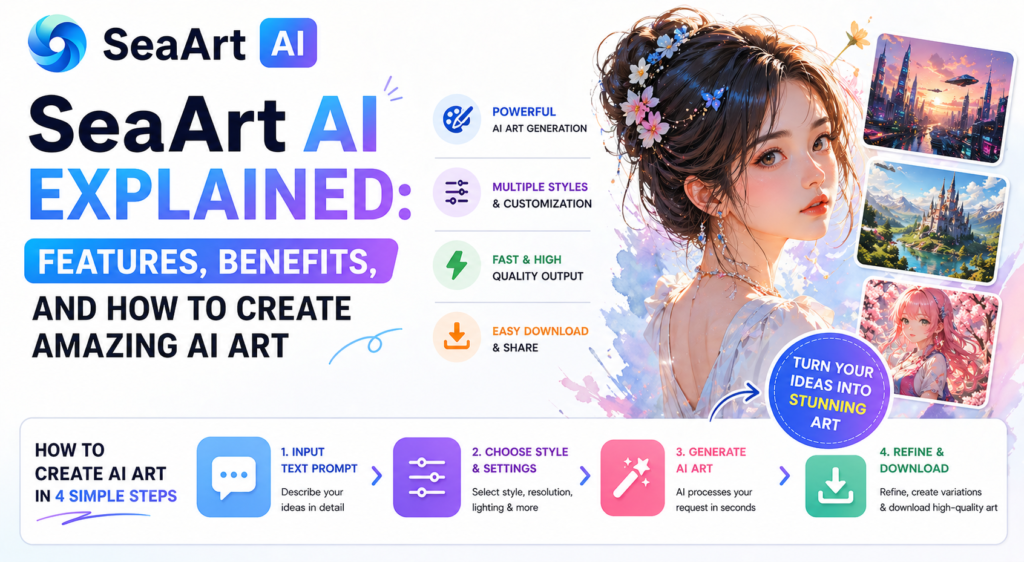
SeaArt AI converts simple text prompts into beautiful images through artificial intelligence. Users start by inputting a description of the image they are after and then tailoring other options, like style, resolution and lighting. Once the input has been set, the AI responds to the request without delay with a beautiful image in seconds. Users further refine the results by clicking on variations or detail adjustments, and finally download high-resolution output for their next creative project, social media posts or professional projects.
Step 1: Input a Text Prompt
Firstly, Users need to input a clear and concise descriptive text prompt explaining what image they would like to generate. The more descriptive the description is, the more faithful and visual fine-tuned will be the result.
For example, “A futuristic city with neon lights during sunset and flying cars”
Step 2: Select Style and Setup
SeaArt AI allows users to improve the output by customizing what they prefer. These include:
- Choose a style (i.e.: anime, realistic, fantasy)
- Resolution settings for image quality
- Lighting and Color Updates for Improved Visual效果
Step 3: Generate Image
Once preferences have been set, users press the generate button and within seconds, images are processed through the AI to create a high quality image almost instantly.
Step 4: Refine and Download
You can enhance the generated images, produce additional modifications of those generations, and acquire the ultimate high-quality artwork in order to use it personally or professionally.
Future of SeaArt AI
The future of SeaArt AI is made for one another, an innovative ecosystem boosted by the rapid evolution in artificial intelligence, experience design and creative ecosystems. There are signs that the platform is turning it from a simple image generator to a fully multimodal creative hub, offering branded users the ability to create images, videos and interactive content in one integrated creative workflow. Next generation AI agents with natural language understanding will simplify creation even further, enabling artistic outputs that are highly complex without any technical experience.
The SeaArt AI platform is also transitioning to a creator-focused ecosystem, enabling collaboration and content sharing between creators on user-generated models on a rapidly expanding creator economy. This transition turns the platform from an isolated instrument into a collaborative network that is in constant enhancement through user contributions. The rollout of products such as AI-native creative platforms and more robust community features signals a heavy emphasis on social, personalization and immersive digital experiences.
SeaArt AI for Content Creators
SeaArt AI is an extremely useful tool for content creators, it helps you to create high quality visuals with the minimum amount of time and effort, even if you are not a qualified designer. Amidst the rapid development of digital world, creators are needing fabulous aids for their work to attract eyes, and SeaArt AI providing it through its very productive text-to-image generating abilities. The service keeps the visual identity consistent and professional, whether it is YouTube thumbnails, Instagram posts that make people stop scrolling, or illustrations for a blog. This not only opens a gateway for new experiences but also enables creators to learn and explore multiple styles, themes, and concepts ultimately fueled by creativity and innovation. It provides fast rendering speed and also customization options which makes sure that the creators render their work well within the time limit while not compromising on quality or originality SeaArt AI helps Content Creators to automate and enhance their productivity, improve audience & engagement quality of their online presence.
Best Practices for Using SeaArt AI
Here are a few best practices that you want to follow with SeaArt AI that will open up the most creative and quality possibilities. Step one is writing a descriptive and detailed prompt since the image that gets generated is highly dependent on how clearly you speak about what the idea looks like. Adding elements like ambiance, lighting, mood, color, composition—everything you can do to make the output better. Additionally, it is also a good practice to play around with the style and environment to find different visual permutations that suit your needs. Multiple iterations help refine results, bringing users closer on the path to a successful outcome-shifting from one idiom (try and try again) to another (repetition is the mother of learning). Also, by working with available customization options like resolution modifications and model selections helps get more finished and conventionally made images. Using or training custom models is incredibly powerful for identity consistency or personal brand. With the right mix of creativity and strategic testing, users can harness the full power of SeaArt AI for a consistent stream of stunning, high-quality art.
Conclusion
SeaArt AI is at the forefront of transforming digital art creation, providing a powerful and easy-to-use solution to produce high-quality images quickly. Equipped with advanced features, yet very easy to use at the same time, it is an essential tool for creators, businesses and designers alike.
SeaArt AI opens up a realm of creative possibilities, helps in maximizing workflows and creates high quality content that outshines its competitors in the digital space.
FAQ — SeaArt AI in Questions
Q1)What is SeaArt AI used for?
SeaArt AI converts your text input into beautiful digital images, making it a great option for designers, content creators, marketers, or anyone else trying to get incredible visual results without spending too much time doing so!
Q2)Is SeaArt AI free to use?
SeaArt AI is available under both free and paid subscriptions. Some features are free; others become available with paid plans that allow users to use advanced tools; faster generation time in higher resolutions.
Q3)You do not have to possess design skills in order to use SeaArt AI.
However, it does not mean that SeaArt AI is suitable for only beginners or authors. Everyone with no design background can easily make jaw-dropping artwork on it thanks to its simple UI.