Artificial Intelligence is quickly revolutionizing how digital content is created, consumed and distributed. In the last couple of years, we have seen video content emerging as one of the most powerful formats across platforms like YouTube, Instagram & TikTok. Historically, it was expensive software and skills to make good videos, along with a considerable time investment. Tools like Pixverse AI enter the game here.
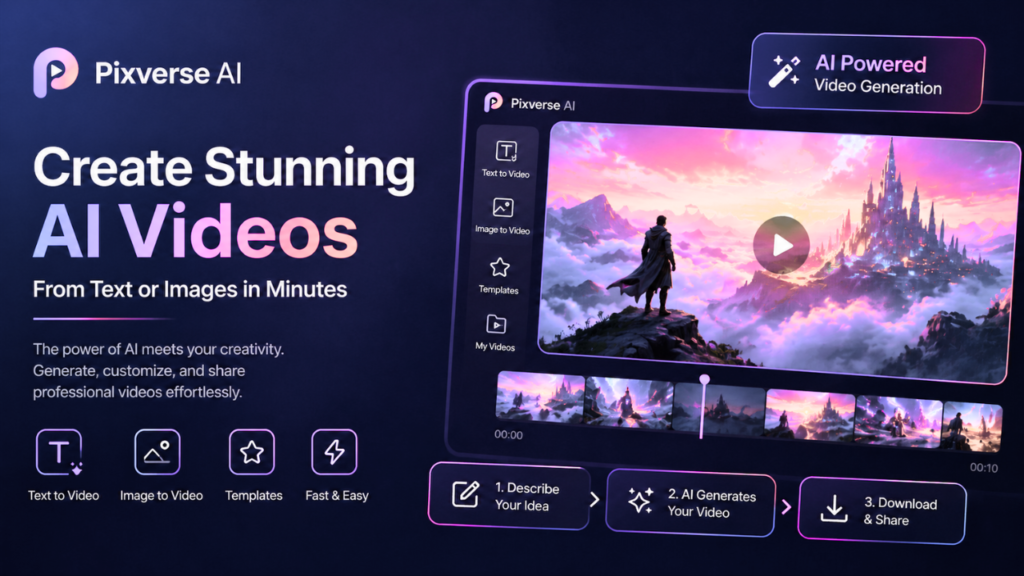
Pixverse AI joins a new breed of generative AI-driven video creation utilities designed to streamline the production process. Pixverse AI is a simple solution if you are new to editing with no experience or an expert looking to speed up workflows. Through special algorithms, it is capable of turning a basic text prompt or an image into entertaining video content within minutes.
This is the most comprehensive guide you will ever read about Pixverse AI, where we will learn everything there is to know about it, including how it works, features, pricing, benefits, use cases, and whether or not you should use Pixverse AI in 2026.
What is Pixverse AI?
Pixverse AI is a video generation platform based on artificial intelligence, with which they can create videos on auto mode through text description, images, or preset templates. Instead of having to edit clips, add transitions, and change colors like a human would do with a video editor, people can now let the AI do all that.
This platform simplifies the steps necessary for making a video. Pixverse AI is affordable and accessible to everyone, from students to freelancers, businesses, and marketers alike, without the need for technical skills.
- It automatically turns text prompts into videos
- Supports image-to-video transformation
- Designed for beginners and professionals
- No need for an advanced video editing task
- Creates content faster and easier
In today’s climate, the massive demand for short-form video content has meant that tools like Pixverse AI will be a vital part of your toolkit.
Also Read: Haiper AI | SeaArt AI
How Pixverse AI Works
Using machine learning models and generative AI technologies, Pixverse analyzes user input and creates images accordingly. The platform, however, is intuitive so that even someone new to video can make a video without getting confused.
It all starts with a not-so-unique idea. Users tell the AI what kind of video they need, and it does everything else. The algorithm breaks down the text, picks relevant visuals, adds animations, and assembles everything into a video.
- Type a text prompt to describe your idea
- Select a style or template
- AI generates scenes and animations
- Preview the generated video
- Make minor edits if needed
- Export or share the final output
All of this automation drastically cuts down on the time needed to make videos, which is a good place to be if you want to get out your content quickly.
Pixverse AI Overview
| Feature | Details |
| Platform Type | AI Video Generator |
| Input Method | Text, Images |
| Output | AI-generated videos |
| Target Users | Creators, marketers, businesses |
| Skill Level | Beginner to advanced |
| Key Benefit | Fast video creation |
Key Features of Pixverse AI
It is because of its powerful features and simplicity that Pixverse AI creates a niche. The features are built to streamline every stage of video creation, from idea all the way to final output.
- Text-to-Video Generation, this is one of those solutions where you are able to create content on demand, given the minimum data input.
- Image-to-video conversion for visual storytelling
- Use case-specific templates you can imagine with
- Customizable styles, colors, and themes
- Fast rendering and processing speed
- User-friendly platform with a short learning curve
Pixverse AI is designed to accommodate all kinds of users, from solo content creators to businesses that want to ramp up their content creation.
Text-to-Video Generation Explained
Probably, one of the coolest features of Pixverse is, its text-to-video functionality. In this feature, the user will just need to describe a scene, and based on that information, the AI will produce a video.
You give it a prompt like “A calming beach at sunset, where you can hear waves and calm music” would make a video with memories of moving images decorated with transitions and effects.
- Creates images from written prompts
- Automatically adds animation, lighting, and transitions
- Crafts compelling narratives automatically
- Reduces production time significantly
- Killer for social media content that could be consumed in minutes
This will be a handy feature for creators looking to make videos in a much quicker fashion while still maintaining creativity.
Image-to-Video Capability
Another unique feature of Pixverse, is image-based video creation, which is beneficial for businesses & marketers.
With the ability to use images and transform them into dynamic visual content, rather than starting with videos to edit. This is generally adapted for product promotion, presentations, or a portfolio.
- Transforms still images into motion-based videos
- Adds transitions and motion effects
- Enhances storytelling through visuals
- Useful for e-commerce and marketing
- Great for Slideshows & Ads
This brings an element of flexibility, as it enables users to try their hand at a new type of content.
Benefits of Using Pixverse AI
Benefits of Pixverse AI, which make it a useful tool in the current era of content generation. It eliminates a lot of the traditional obstacles related to video editing.
A significant time saver that takes care of some of the more intricate editing tasks to save you a lot of hours.
- Decreases the requirement for technical expertise
- More cost-effective than professional editing software
- Enables consistent content production
- Suitable for individuals and businesses
- Enhances creativity with AI-generated ideas
This is why Pixverse AI is a great tool for anyone who wants to make videos quickly.
Pros & Cons of Pixverse AI
| Pros | Cons |
| Easy to use | Limited advanced editing control |
| Fast video generation | Output quality may vary |
| Affordable solution | Requires an internet connection |
| Great for beginners | May lack deep customization |
| Multiple input options | Still evolving technology |
Pixverse AI Use Cases
It can be applied to most industries and needs. You can use it for professional and personal purposes because it really goes fast while generating content.
- Social media video creation
- YouTube content production
- Digital marketing campaigns
- Product advertisements
- Educational videos and tutorials
- Storytelling and creative projects
The platform is flexible enough that users will be able to tailor it to fit their exact needs.
Pixverse AI for Content Creators
As a content creator, producing high-quality videos while also maintaining consistency is a huge problem. It will play a major role in streamlining the process, providing conveniences that minimize the time and effort you have to dedicate to it.
AI does the legwork, and creators come up with creative ideas and stories. This really helps for those platforms that require a lot of uploads.
Pixverse AI allows creators to explore various styles and formats without investing in exorbitant tools. Another, but not the least important thing that it keeps the content pipeline ongoing, and this is crucial for your audience growth.
Pixverse AI for Businesses
Businesses can leverage the power of Pixverse AI for marketing and promotion-related activities. Video content is clearly a great driver of engagement, and AI tools facilitate the scale at which you can produce this type of content.
Pixverse AI is a tool that helps businesses rapidly create advertisements, product demos, and posts for social media. It decreases reliance on professional video editors as well as production budgets.
So, a powerful capability of generating multiple videos in less time enables companies to execute more dynamic and frequent marketing campaigns.
Pricing of Pixverse AI
Pixverse AI is usually a freemium pricing model, so it can be accessible to most users.
The free edition lets users test out basic functionality, while premium plans open access to more sophisticated features like better-quality exports, protracted videos & customizations.
Pricing depends on usage, features, and subscription plans, but usually prices are more affordable than traditional video editing software.
Limitations of Pixverse AI
However, Pixverse AI does have its downsides as well that the users should know.
- Limited control over detailed editing
- Output/image may not always be 100% correct
- Requires a stable internet connection
- Not great for more complicated video projects
- Need several passes for the desired effect
These limitations point out that Pixverse AI is better utilized as an assisting platform and not a true replacement for professional editing software.
Also Read: OpenFuture AI | Physics Wallah
Future of Pixverse AI
As AI technology continues to evolve rapidly, the future of Pixverse AI seems bright. As machine learning continues to improve, we can only expect more intricate and realistic video generation tools in the future.
Subsequent updates could include quality animation, innumerable customisation options, AI voice interactions, and speedier processing. With these enhancements integrated, Pixverse AI may turn out to be an even more indispensable resource for content creators and enterprises.
Conclusion
Pixverse AI is a simple yet powerful software that helps create a video. This is particularly useful for anyone who wants to quickly create videos without fiddling around with dense editing software, including beginners, marketers, and content creators.
It is well known for its simplicity, speed, and price. It’s no replacement for professional editing software, but it is a great solution for day-to-day content creation.
If you want a tool that is easy to use and helps you make interesting videos in 2026, Pixverse AI should be on your radar.
Frequently Asked Questions (FAQs)
1. What is Pixverse AI used for?
Pixverse AI is a platform for converting text or images into videos using Artificial Intelligence (AI).
2. Is Pixverse AI free?
The free plan has limited features, and paid plans for advanced use.
3. Can beginners use Pixverse AI?
Yes, it is tailored for rookies without any editing expertise.
4. Is Pixverse AI Useful for YouTube Videos?
Yes, especially for Short and easy-to-comprehend videos.
5. How Good Is Pixverse AI?
It is good for fast, affordable, simple video creation.